Evolutionary rate tests
Purpose of this lab
- Calculate rate tests for sets of taxa.
- Conclude: Discuss finding in terms of rates of evolution for your gene.
Can’t wait to get started? Scroll or click The assignment: apply Tajima rate test to your gene tree
Background
The apply the molecular clock model of evolution to our gene tree of the 14 taxa in order to estimate the rate of evolutionary change. The primary assumption is that the rate of molecular evolution (specifically, the rate of amino acid substitutions) is roughly constant over time and across different lineages. In this exercise we provide the second of two ways to test whether or not this assumption holds for our gene trees: Tajima’s rate test. The other option, tree reconciliation, is described at Project Essential: Working with gene tree: Reconciliation.
Slides to support this text and brief how to video with CompPhy and Unipro UGENE. The slide show lacks narration.
Evolution is change in the heritable characteristics of biological populations over successive generations. Speciation, from one interbreeding population to two separate populations, leads to lineages isolated from each other. Isolation means that the two populations do not exchange genes, and, therefore, any changes that may occur over generations for the sequence of a gene in one species, whether by genetic drift or natural selection, are independent of changes that may have occurred in the sister species.
The forces* that create genetic variation (mutation, recombination) and filter genetic variation (natural selection, genetic drift) in populations may occur at the same rates in the two distinct lineages, but by no means is this assumption likely to be true for all genes or DNA elements. For example, if one population undergoes a bottleneck, a severe reduction in population size, then this population would see significant reduction in genetic variation because of random genetic drift on the kinds of alleles present in the population. In the previous, related exercise, Tree reconciliation, you compared the topology of your gene tree is compared to a species consensus phylogeny. This approach highlights any inconsistencies between genes, and the the evolutionary histories of species.
In this exercise you are going to apply a simple statistical test, Tajima’s rate test, on the numbers of amino acid differences between pairs of taxa compared to an outgroup. The null hypothesis is we expect the amount of differences since two taxa last shared a common ancestor to be the same (i.e., equal branch lengths). This is derived from the Molecular Clock hypothesis, which is that changes in sequences occur more or less at a constant rate.
Note 1. The use of the term “force” is an analogy, not to be confused with the forces of Newtonian mechanics.
A rate test
So far we have descriptions, eg, tree difference estimates Tree Reconciliation, of whether or not your gene shows lineage differences for rates of evolution. We need to test whether or not the differences are large enough to be statistically different from chance. Remember, we expect differences, but differences proportional to time. Evidence of differential rates are suggestive of natural selection, not chance (genetic drift). We have one way to test the assumption of equal rates, Tajima’s rate test (Fig. 1). Compared to an outgroup, test for accumulation of amino acid changes between two species; if the rates are equal, then the differences between the outgroup and species should be equal. This is Tajima’s relative rate test (1993).
It’s straight-forward to represent how the test works. We have two species,  and
and  . Set the rates for evolution for your gene as
  for , and
  for .
for .
and last shared a common ancestor some time ago, which means that prior to speciation, we can assume that their was an ancestral protein sequence, perhaps represented by an outgroup; this rate is represented by  .
.
After speciation, what happens to the gene is lineage specific leading to , and conversely, independent of changes leading to .
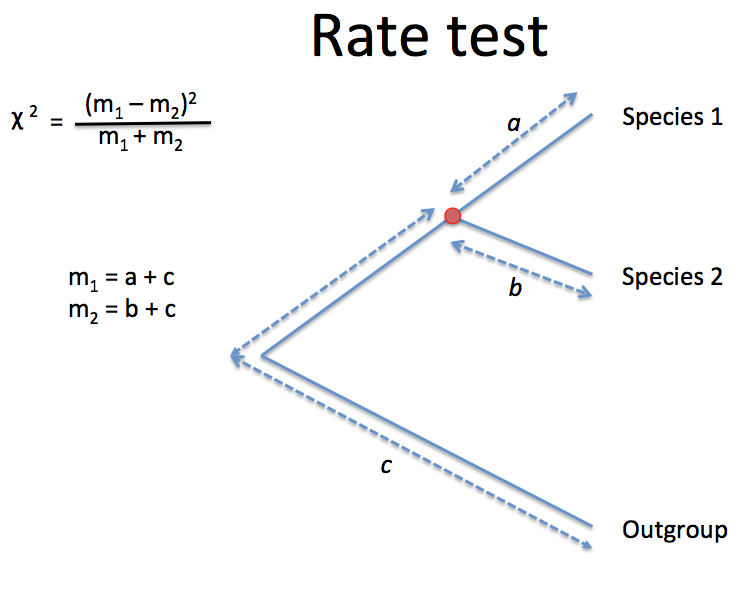
Figure 1. Tajima’s rate test statistic is distributed as a chi square.
Thus, we have two rates to compare:  accounts for all of the changes since the outgroup and last shared a common ancestor, plus
  , which accounts for all of the changes since the outgroup and last shared a common ancestor.
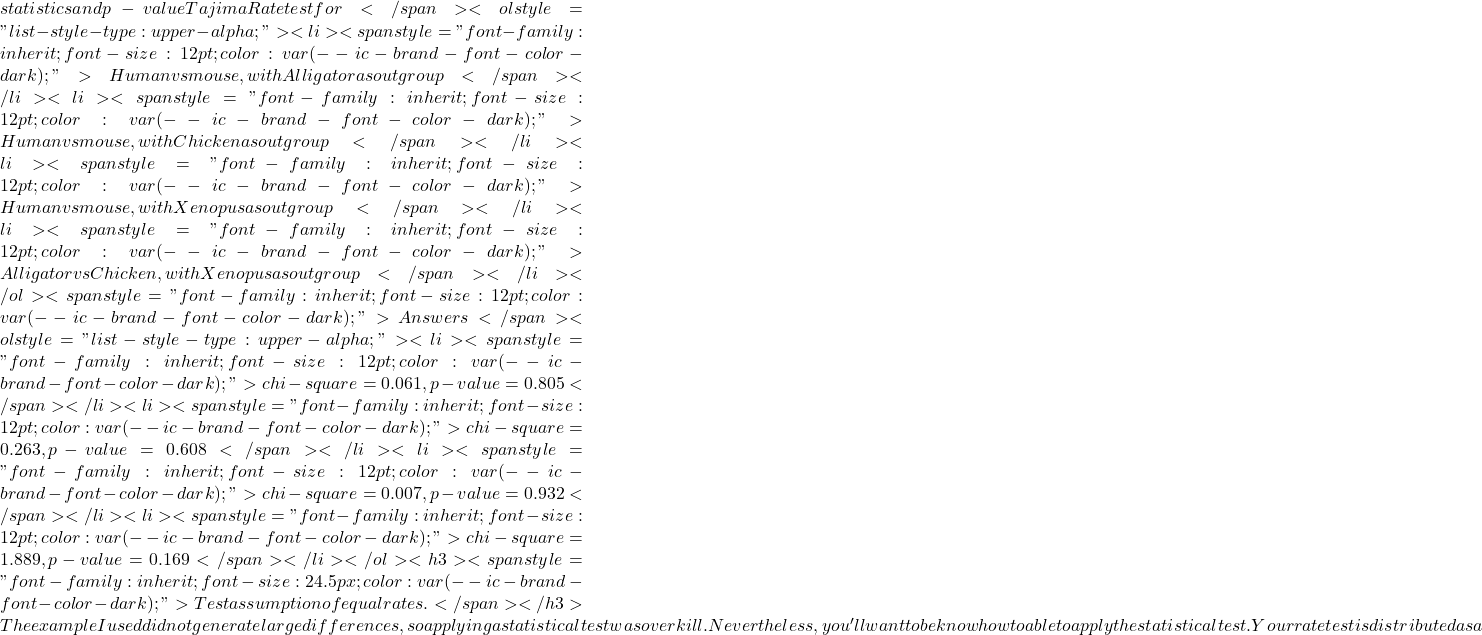
The rate test statistic behaves like a chi-square test,  , the equation shown in Fig 2 should look familiar.
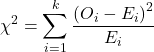
Figure 2. Equation of the chi-square, where O is Observed and E is expected.
The differences in the equations are just how Observed and Expected are calculated. Otherwise, the concept is the same. The null hypothesis for the rate test is that  \chi^{2}
 O = E
O = E >
> Species \ 1
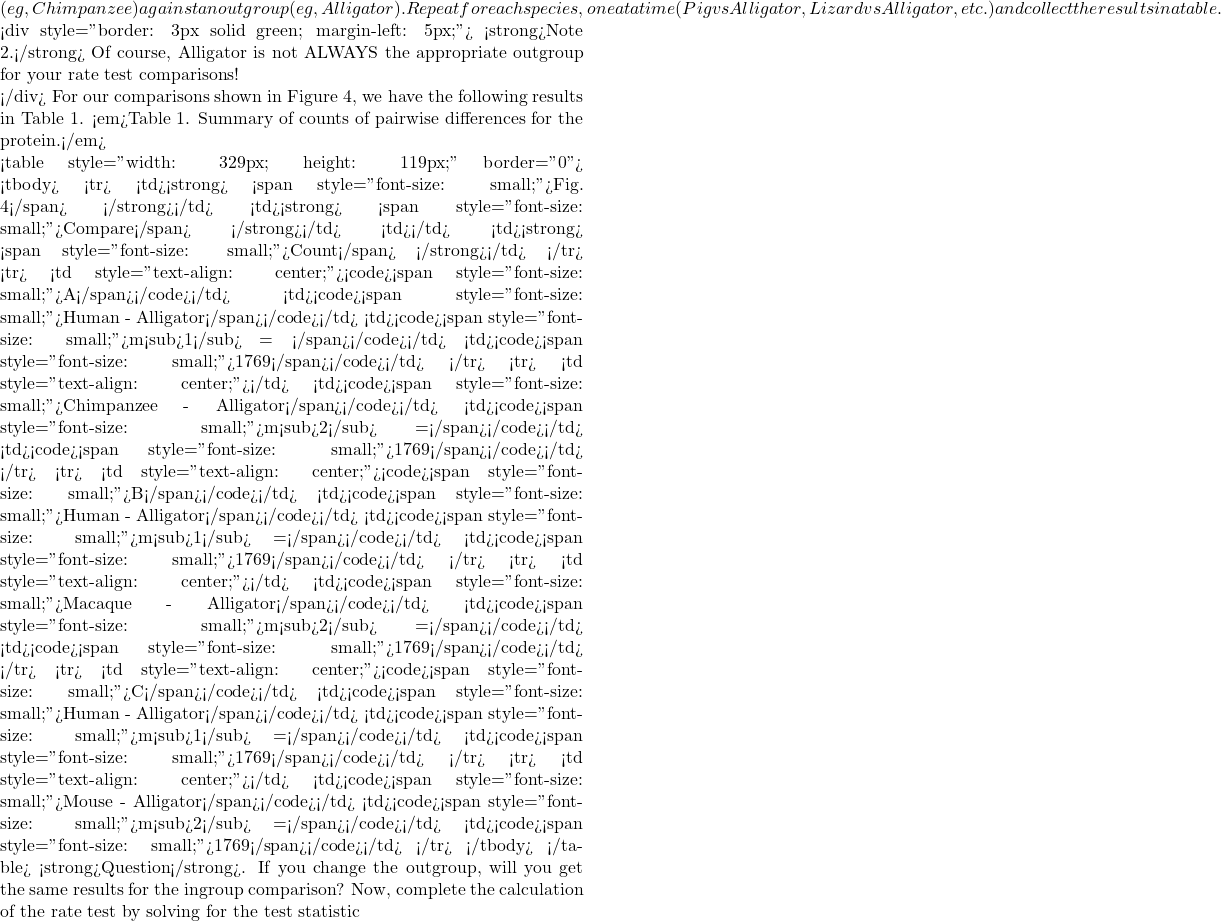 =\frac{(m_{1} – m_{2})^2{(m_{1}+m_{2})}
 \chi^{2}
 \chi^{2}
 2-D3)^2)/(D
 2-D4)^2)/(D
 2-D5)^2)/(D
 \chi^{2}
 \chi^{2}
 \chi^{2}
 \chi^{2}
 x
x x
x x$ is small, then we conclude little evolution has occurred.
To calculate these rates tests one at a time, the commands you submit to R are
#Calculate your rate test statistics and the probability of your chi-square. Replace m1 and m2 with your values
m1 = 130
m2 = 159
x =(m1-m2)^2/(m1+m2)
pchisq(c(x),df=1,lower.tail=FALSE)
After submitting the command, R returns with what we want, the p-value of the test.
[1] 0.08802999
or 8%. Again, you can run this code below or at the https://rdrr.io/snippets/ website.
To calculate the rates for a set, use the following R code
#Calculate your rate test statistics and the probability of your chi-square.
#Replace a and b with your values
#This example, a = human v. opossum, and b = opossum v cat, chimp, cow, dog, macaque, mouse, pig, rat, rabbit
m1 = 130
m2 = c(127, 129, 168, 126, 126, 159, 134, 203, 139)
x =(m1-m2)^2/(m1+m2)
results<-pchisq(c(x),df=1,lower.tail=FALSE)
#prints out the p-values in order
cat(results, sep = "\n")
which returns a column of p-values for each comparison
Thus, p-values for rate tests for human vs cow and human vs. rat are less than 5% and we could conclude the rates are not equal. Because the p-values were greater for the other comparisons, we would conclude rates equal.
Why 5% for decision criteria to reject/accept the null hypothesis? For those of you who remember your basic statistics, we set statistical significance at 5%. If the result of your rate test yields a p-value less than 5%, then we say our results are likely different from the null hypothesis. If the p-value is greater than 5%, we say our results are not likely different than the null hypotheses.
So, completing our example, we have the following probability calculations given our estimates of the rate tests for each comparison.
Table 5. A portion of the rate test results.
| Fig. 4 | Compare | (m1-m2)2/(m1+m2) | p-value | P < 0.05? |
| A | Human – Alligator | |||
| Chimpanzee – Alligator | 0 | 1 | No | |
| B | Human – Alligator | |||
| Macaque – Alligator | 0 | 1 | No | |
| C | Human – Alligator | No | ||
| Mouse – Alligator | 0 | 1 | No |
Note 4: We typically judge statistical significance if the p-value is less than or equal to 5%.
Troubleshooting.
If you get results like my Table 6, change your outgroup Reference sequence to the Marsupial, eg, opossum. You then make rate tests for the Eutherian mammals (humans, chimps, rats, mice, etc) against the Marsupial outgroup, instead of against the alligator.
Table 6. A portion of the rate test results using Outgroup=opossum.
| Fig. 4 | Compare | (m1-m2)2/(m1+m2) | chi.sqr | p-value | P < 0.05? |
A |
Human - Opossum |
|
|||
Chimpanzee - Opossum |
(130-129)2/(130+129) |
0.00386 |
No |
||
B |
Human - Opossum |
|
|||
Macaque - Opossum |
(130-126)2/(130+126) |
0.0625 |
No |
||
C |
Human - Opossum |
||||
Mouse - Opossum |
(130-159)2/(130+159) |
2.910 |
No |
Proteins? Why not look directly at CDS?
The best approach follows work by comparing aligned CDS sequences for synonymous vs nonsynonymous changes. Instead of NP_ sequences, download the appropriate NM_ sequences for your GOI for the different species in your study. After alignment, translate the sequences and count the missense mutations. The idea is that if, as we suspect, the substitutions in a DNA sequence follow a Poisson distribution, then the variance of substitutions and the mean of substitutions will be equal to one (Gillespie 1989), called the Index of Dispersion, R (variance to mean ratio).
What to turn in.
Create a table of results like Table 2 above, but for your own protein. Chaminade students: Copy/paste the table at Submit results: Rate tests in CANVAS homework page.
References
Pybus, O. G. (2006). Model selection and the molecular clock. PLoS Biology , 4 (5).
About R
You have two options for using R.
- Install R onto your computer.
- As an alternative, you can take advantage of rdrr.io, which allows you to run small amounts of R code online.
- Or you can run your code snippets from this page, see Run your R code!
Let’s discuss the second option first. You can run small amounts of code at https://rdrr.io/snippets/ (or from the homepage, click on “Run R code online”), or even from this page (scroll to the bottom, or click here, and you’ll find an embedded R snippet). Simply copy/paste or enter your commands in the box, replacing the example code there. An example of one of our code snippets is shown in Fig 3. Another option — You may want to explore using Jupyter Notebooks, which allow you to mix R code snippets with other text or graphs (in other words, a nice way to do bioinformatics! A way to combine your code methods with results for your lab notebook).
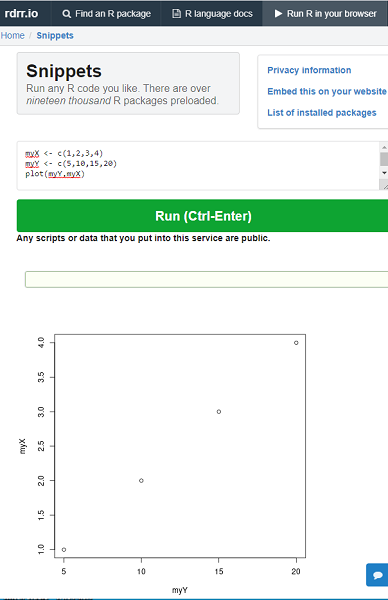
Figure 6. Screenshot from rdrr.io with R code snippet.
The first option is the best option: go ahead and get for yourself an up-to-date copy of R installed on your computer. Once you install R on your own computer, you’ll also need to download and install two additional packages, ape and phytools.
Regardless of the option you choose, proceed by copy/paste the code I provide below, one line at a time at the R prompt. For , or better, create a script file (from the R GUI, File → New document). Run each command one a time: simply hit the Enter key to submit the command; if using a script file, then Ctrl+R for windows PC, Command + Enter for macOS.
R works line by line; lines that begin with # are ignored by R and are provided as comments or notes about the code. Text in blue represents the code you enter; text in red represents the output R provides in response to the commands.
You can run your R code directly from this page, or go to rdrr.io
Run your R code!
Copy and paste R code here. Edit as needed.
/MD